It sometimes seems like the Security Response Team at Red Hat are pushing security updates every day, but actually a default installation of Enterprise Linux 4 AS was vulnerable to only 7 critical security issues in the first three years since release. But to get a picture of the risk you need to do more than count vulnerabilities.
My full risk report was published yesterday in Red Hat Magazine and reveals the state of security since the release of Red Hat Enterprise Linux 4 including metrics, key vulnerabilities, and the most common ways users were affected by security issues.
"Red Hat knew about 49% of the security vulnerabilities that we fixed in advance of them being publicly disclosed. For those issues, the average notice was 21 calendar days, although the median was much lower, with half the private issues having advance notice of 8 days or less."
Last Friday, just as I was finishing work for the day, an email appeared in my mailbox from the UK CPNI announcing a public remote code execution flaw in Apache on HP-UX. As Chair of the Apache Software Foundation Security Team I knew there were no outstanding remote code execution flaws in Apache HTTP server (in fact we've not had a remote code execution flaw for many years) so I was expecting to invoke the Red Hat Critical Action Plan which would have meant a rather long weekend for me, my team, and various development and quality engineering staff.
First thing to do was to find the original source of the advisory, as co-ordination centres and research firms are known to often play the Telephone game, with advisory texts mangled beyond recognition. Following the links led to the actual advisory on the HP site. This describes the vulnerability as follows:
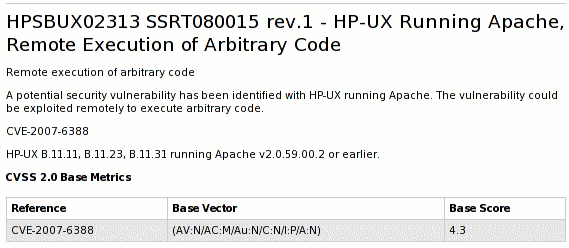
But then they give the CVE name for the flaw, CVE-2007-6388, which is a known public flaw fixed last month in various Apache versions from the ASF and in updates from various vendors that ship Apache (including Red Hat).
This flaw is a cross-site scripting flaw in the mod_status module. Note that the server-status page is not enabled by default and it is best practice to not make this publicly available. I wrote mod_status over 12 years ago and so I know that this flaw is exactly how the ASF describes it; it definitely can't let a remote attacker execute arbitrary code on your Apache HTTP server, under any circumstances.
I fired off a quick email to a couple of contacts in the HP security team and they confirmed that the flaw they fixed is just the cross-site scripting flaw, not a remote code flaw. The CVSS ratings they give in their advisory are consistent with it being a cross-site scripting flaw too.
So happy with a false alarm we cancelled our Critical Action Plan and I went off and had a nice weekend practicing taking panoramas without a tripod ready for an upcoming holiday. My first attempt came out better than I expected:

Secunia released a security summary report for 2007 and surprisingly gave a count for Red Hat for the year at over 600 vulnerabilities. I had no idea how they got to this number, it certainly doesn't match our own publicly available metrics at https://www.redhat.com/security/data/metrics
Using our public tool, for every Red Hat product and service, for 2007 we issued 306 advisories to fix 404 vulnerabilities. Of those 404 vulnerabilities 41 were critical (on the scale used by Microsoft and Red Hat).
Most people are not going to be using every Red Hat product, so taking just Enterprise Linux product you find 348 vulnerabilities, of which 27 were critical. A given user is going to only be vulnerable to the issues that affect the products and packages they have installed. Using the scripts on our pages you can figure it out for your own circumstances. But as an example, the default installation of Red Hat Enterprise Linux 4 AS had 172 vulnerabilities of which 4 were critical.
The Secunia report does actually make it clear you can't use their vulnerability count as a method of comparing platforms, in part due to the differences in methodology of the vendors, but I'm sure this won't stop some press from jumping to conclusions if they don't read the actual report.
I've asked Secunia how they got to their number of vulnerabilities, but in the meantime, a raw count of vulnerabilities is only a small part of the overall risk exposure in using a product. I've got some more reports that go into this in more detail for two years of Enterprise Linux 4 and Enterprise Linux 5.0 to 5.1.
Update: Coverage of this: ZDNet
Update: Secunia told me that they treat each advisory separately; so for example yesterday we issued updates for some moderate severity issues in the Apache Web server, but we did separate advisories for each affected product: Red Hat Enterprise Linux 2.1, 3, 4, 5, Red Hat Application Stack v1, v2. So in this case the same Apache vulnerability would be counted 6 times.
A year ago I published a table of Security Features in Red Hat Enterprise Linux and Fedora Core. Since then we've released two more Fedora versions, and a Red Hat Enterprise Linux, so it's time to update the table.
Between releases there are lots of changes made to improve security and I've not listed everything; just a high-level overview of the things I think are most interesting that help mitigate security risk. We could go into much more detail, breaking out the number of daemons covered by the SELinux default policy, the number of binaries compiled PIE, and so on.
| Fedora Core | Fedora | Red Hat Enterprise Linux | |||||||||
| 1 | 2 | 3 | 4 | 5 | 6 | 7 | 8 | 3 | 4 | 5 | |
| 2003Nov | 2004May | 2004Nov | 2005Jun | 2006Mar | 2006Oct | 2007May | 2007Nov | 2003Oct | 2005Feb | 2007Mar | |
| Firewall by default | Y | Y | Y | Y | Y | Y | Y | Y | Y | Y | Y |
| Signed updates required by default | Y | Y | Y | Y | Y | Y | Y | Y | Y | Y | Y |
| NX emulation using segment limits by default | Y | Y | Y | Y | Y | Y | Y | Y | Y2 | Y | Y |
| Support for Position Independent Executables (PIE) | Y | Y | Y | Y | Y | Y | Y | Y | Y2 | Y | Y |
| Address Randomization (ASLR) for Stack/mmap by default3 | Y | Y | Y | Y | Y | Y | Y | Y | Y2 | Y | Y |
| ASLR for vDSO (if vDSO enabled)3 | no vDSO | Y | Y | Y | Y | Y | Y | Y | no vDSO | Y | Y |
| Restricted access to kernel memory by default | Y | Y | Y | Y | Y | Y | Y | Y | Y | ||
| NX for supported processors/kernels by default | Y1 | Y | Y | Y | Y | Y | Y | Y2 | Y | Y | |
| Support for SELinux | Y | Y | Y | Y | Y | Y | Y | Y | Y | ||
| SELinux enabled with targeted policy by default | Y | Y | Y | Y | Y | Y | Y | Y | |||
| glibc heap/memory checks by default | Y | Y | Y | Y | Y | Y | Y | Y | |||
| Support for FORTIFY_SOURCE, used on selected packages | Y | Y | Y | Y | Y | Y | Y | Y | |||
| All packages compiled using FORTIFY_SOURCE | Y | Y | Y | Y | Y | Y | |||||
| Support for ELF Data Hardening | Y | Y | Y | Y | Y | Y | Y | ||||
| All packages compiled with stack smashing protection | Y | Y | Y | Y | Y | ||||||
| SELinux Executable Memory Protection | Y | Y | Y | Y | |||||||
| glibc pointer encryption by default | Y | Y | Y | Y | |||||||
| FORTIFY_SOURCE extensions including C++ coverage | Y | ||||||||||
Red Hat Enterprise Linux 5.1 was released today, around 8 months since the release of 5.0 in March 2007. So let's use this opportunity to take a quick look back over the vulnerabilities and security updates we've made in that time, specifically for Red Hat Enterprise Linux 5 Server.
The graph below shows the total number of security updates issued for Red Hat Enterprise Linux 5 Server up to and including the 5.1 release, broken down by severity. I've split it into two columns, one for the packages you'd get if you did a default install, and the other if you installed every single package (which is unlikely as it would involve a bit of manual effort to select every one). So, for a given installation, the number of packages and vulnerabilities will be somewhere between the two extremes.

So for all packages, from release up to and including 5.1, we shipped 94 updates to address 218 vulnerabilities. 7 advisories were rated critical, 36 were important, and the remaining 51 were moderate and low.
For a default install, from release up to and including 5.1, we shipped 60 updates to address 135 vulnerabilities. 7 advisories were rated critical, 26 were important, and the remaining 27 were moderate and low.
- These figures include ten updates we released on the day we shipped 5.0. This was because we froze package updates some months before releasing the product. Only one of those updates was rated critical, an update to Firefox.
- The six other critical updates were:
- Three more updates to Firefox (May, July, October) where a malicious web site could potentially run arbitrary code as the user running Firefox. Given the nature of the flaws, ExecShield protections in RHEL5 should make exploiting these memory flaws harder.
- An update to the Kerberos telnet deamon (April) A remote attacker who can access the telnet port of a target machine could log in as root without requiring a password. None of the standard protection mechanisms help prevent exploitation of this issue, however the krb5 telnet daemon is not enabled by default in Enterprise Linux 5 and the default firewall rules block remote access to the telnet port. This flaw did not affect the more common telnet daemon distributed in the telnet-server package.
- An update to Samba (May) where a remote attacker could cause a heap overflow. In addition to ExecShield making this harder to exploit, the impact of any sucessful exploit would be reduced as Samba is constrained by an SELinux targeted policy (enabled by default).
- An update to the PCRE library (November). This was labelled critical because the Konqueror web browser uses PCRE to handle regular expressions in JavaScript, and therefore a user browsing a malicious site in Konqueror could trigger this issue. (Konqueror is not part of a default install, but I've left this issue as critical in the results).
- Updates to correct all of these critical issues were available via Red Hat Network within a day of the issues being public.
Red Hat Enterprise Linux 5 shipped with a number of security technologies designed to make it harder to exploit vulnerabilities and in some cases block exploits for certain flaw types completely. For the period of this study there were two flaws blocked that would otherwise have required critical updates:
- A stack buffer overflow flaw in the RPC library in Kerberos. This flaw was blocked by FORTIFY_SOURCE which removed the possibility of remote code execution. We still issued an update, as a remote attacker could trigger this flaw and cause Kerberos to crash.
- Another flaw in Kerberos, this time due to the free of an invalid pointer. This flaw was blocked by glibc, although a remote attacker could still cause a crash, so we issued an update.
This data is interesting to get a feel for the risk of running Enterprise Linux 5 Server, but isn't really useful for comparisons with other versions or distributions -- for example, a default install of Red Hat Enterprise 4AS did not include Firefox. You can get the results I presented above for yourself by using our public security measurement data and tools, and run your own metrics for any given Red Hat product, package set, timescales, and severities.
Back in August I found that many of the Common Vulnerability Scoring System (CVSS) scores that the National Vulnerability Database (NVD) assigned to vulnerabilities affecting open source software were incorrect.
Since then I've been sending in corrections on a monthly basis, taking into account the worst possible score across all affected platforms (and not how Red Hat products were affected specifically).
For the five months May to September 2007 I looked at 178 vulnerabilities (across all Red Hat products and services). Only 80 were accurate. Corrections were submitted to NVD and they fixed the incorrect CVSS scores on the remaining 98 vulnerabilities.
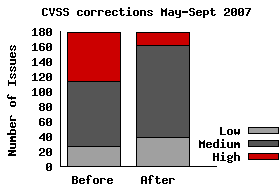
So, before the corrections, there were 65 issues rated "High" out of 178. After the corrections there are actually only 17 rated "High".
Fortunately the number of corrections needed each month seems to be decreasing, but we'll continue to send in corrections every month. Even with the corrections, the severity rating for a given vulnerability may well vary for the version each vendor ships; so you need to be careful if you are basing your risk assesments soley on the accuracy of third-party severity ratings.
The National Vulnerability Database (NVD) assign a severity rating to every vulnerability; "High", "Medium", or "Low". The rating is determined by ranges of CVSS (Common Vulnerability Scoring System) v2 scores. I've not been a big fan of CVSS: I don't think it works particularly well when applied to software that is shipped by multiple vendors, or for open source software and libraries that don't know all the possible use-cases of their software.
Even though I'm not a fan, NVD publish a CVSS score for every issue, security companies are using those scores in their vulnerability feeds to customers, and people are using them for metrics. So it's important that these scores are accurate.
I decided to take a look at how accurate the CVSS scores were, so for every vulnerability we fixed in any Red Hat product for June 2007 examined the CVSS score given by NVD. For each one figuring out if the CVSS base metrics were correct, and where they were not submitting the correction back to NVD. This analysis of the vulnerabilities was based on their possible worst-case threat to all platforms (I didn't adjust the CVSS scores for how the issues affected Red Hat products specifically).
There were 39 total vulnerabilities for which unfortunately only 8 scores were accurate. I submitted corrections to NVD and they fixed the CVSS scores on the remaining 31 vulnerabilities.
20 vulnerabilities ended up moving down in ranking, 6 vulnerabilities moved up, and 5 stayed the same (although the CVSS score changed).
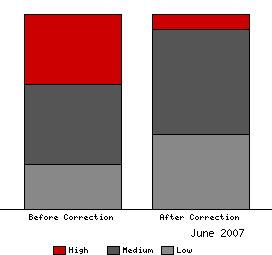
Before the corrections there were 14 issues rated "High" out of 39, after the corrections there are just 3 rated "High".
Those corrections are now live in the NVD, and I really appreciate how quick the folks behind NVD were at checking and making the changes. I've submitted to them corrections for a couple more months too, and I'll write about those when there complete. Unfortunately it does take a lot of time to investigate each issue and do the corrections, so it will limit how far back into 2007 we can correct.
Although Red Hat is well known for Red Hat Enterprise Linux we actually have a large number of other supported products, both layered on top of Enterprise Linux (like Red Hat Application Stack) and stand-alone (like Red Hat Directory Server). The majority of these products are serviced through the Red Hat Network and get our security advisories in a standard way and are included in the Security Response Team metrics. But our analysis scripts were not particularly consistent in dealing with product names.
Common Platform Enumeration (CPE) is a naming scheme designed to combat these inconsistencies, and is part of the 'making security measurable' initiative from Mitre. From today we're supporting CPE in our Security Response Team metrics: we publish a mapping of Red Hat advisories to both CVE and CPE platforms (updated daily) and you can use CPE to filter the metrics. Some examples of CPE names:
cpe://redhat:enterprise_linux:5:server/firefox -- the Firefox browser package on Red Hat Enterprise Linux 5 server.
cpe://redhat:enterprise_linux:3 -- Red Hat Enterprise Linux 3
cpe://redhat/xpdf -- the xpdf package in any Red Hat product.
cpe://redhat:rhel_application_stack:1 -- Red Hat Application Stack version 1
For the past 12 months I've been keeping metrics on the types of issues that get reported to the private Apache Software Foundation security alert email address. Here's the summary for Jul 2006-Jun 2007 based on 154 reports:
|
User reports a security vulnerability (this includes things later found not to be vulnerabilities) | 47 (30%) | ||
|
User is confused because they visited a site "powered by Apache" (happens a lot when some phishing or spam points to a site that is taken down and replaced with the default Apache httpd page) | 39 (25%) | ||
|
User asks a general product support question | 38 (25%) | ||
|
User asks a question about old security vulnerabilities | 21 (14%) | ||
|
User reports being compromised, although non-ASF software was at fault (For example through PHP, CGI, other web applications) | 9 (6%) |
That last one is worth restating: in the last 12 months no one who contacted the ASF security team reported a compromise that was found to be caused by ASF software.
The National Vulnerability Database provides a public severity rating for all CVE named vulnerabilities, "Low" "Medium" and "High", which they generate automatically based on the CVSS score their analysts calculate for each issue. I've been interested for some time to see how well those map to the severity ratings that Red Hat give to issues. We use the same ratings and methodology as Microsoft and others use, assigning "Critical" for things that have the ability to be remotely exploited automatically through "Important", "Moderate", to "Low".
Given a thundery Sunday afternoon I took the last 12 months of all possible vulnerabilities affecting Red Hat Enterprise Linux 4 (from 126 advisories across all components) from my metrics page and compared to NVD using their provided XML data files. The result broke down like this:
| Red Hat |
| ||||
| NVD |
|
So that looked okay on the surface; but the diagram above implies that all the issues Red Hat rated as Critical got mapped in NVD to High. But that's not actually the case, and when you look at the breakdown you get this result: (in number of vulnerabilities)
| NVD: High |
|
| NVD: Moderate |
|
| NVD: Low |
|
That shows nearly half of the issues that NVD rated as High actually only affected Red Hat with Moderate or Low severity. Given our policy is to fix the things that are Critical and Important the fastest (and we have a pretty impressive record for fixing critical issues), it's no wonder that recent vulnerability studies that use the NVD mapping when analysing Red Hat vulnerabilities have some significant data errors.
I wasn't actually surprised that there are so many differences: my hypothesis is that many of the errors are due to the nature of how vulnerabilities affect open source software. Take for example the Apache HTTP server. Lots of companies ship Apache in their products, but all ship different versions with different defaults on different operating systems for different architecture compiled with different compilers using different compiler options. Many Apache vulnerabilities over the years have affected different platforms in significantly different ways. We've seen an Apache vulnerability that leads to arbitrary code execution on older FreeBSD, that causes a denial of service on Windows, but that was unexploitable on Linux for example. But it has a single CVE identifier.
So if you're using a version of the Apache web server you got with your Red Hat Enterprise Linux distribution then you need to rely on Red Hat to tell you how the issue affects the version they gave you -- in the same way you rely on them to give you an update to correct the issue.
I did also spot a few instances where the CVSS score for a given vulnerability was not correctly coded. CVSS version 2 was released last week and once NVD is based on the new version I'll redo this analysis and spend more time submitting corrections to any obvious mistakes.
But in summary: for multi-vendor software the severity rating for a given vulnerability may very well be different for each vendors version. This is a level of detail that vulnerability databases such as NVD don't currently capture; so you need to be careful if you are relying on the accuracy of third party severity ratings.